Tuesday, 8 April 2014

BlackBerry Z30 review

blackberry-z30-10-635.jpg

Earlier this year, BlackBerry introduced the revamped BlackBerry 10 OS and the first handsets based on the new platform in the form of the full-touch BlackBerry Z10 and the touch-cum-QWERTY BlackBerry Q10. While the smartphones and BlackBerry 10 OS (Review) received a mixed response from the critics, the BlackBerry Z10, especially, did not find many takers in the real world, with the company recently revealing it had taken a huge write-off on unsold BlackBerry Z10 units.
It is in this backdrop that the BlackBerry Z30 debuts as company’s first ‘phablet’ and a successor to the BlackBerry Z10 (Review I Pictures) as the new all-touch flagship. Is it old wine in a new bottle, or is the overall package compelling enough for the BlackBerry faithful and, indeed, others in the market for a smartphone? Let’s find out.
Design/ Build
blackberry-z30-design-635.jpg At first glance, the BlackBerry Z30 looks like a host of other smartphones out there, but once you pick it up, the phone seems quite solid. At 170 grams, the phone isn’t the lightest to lug around, but the weight is well spread out around its 140.70 x 72.00 x 9.40mm frame, and the phone doesn’t feel bulky. We especially liked the textured back that exudes a premium feel.
The power/ lock button is on the top, which seems like a strange decision for a phone this size. However, you don’t mind this as much as you would on, say, an Android phone, as simply swiping up from the bottom of the screen wakes up the phone, so you don’t find yourself reaching for the button to unlock the Z30.
While the rear cover of the BlackBerry Z30 is removable, the battery inside is not, which means you can only access the microSD and micro-SIM slots.
Display
blackberry-z30-11-635.jpg
The BlackBerry Z30 comes with a 5.0-inch 720×1280 resolution AMOLED display, which translates to roughly 295 pixels per inch. While that may not compare favourably on paper to phones like the HTC One, you’ll not be disappointed with the display on the Z30. The colours are rich thanks to the AMOLED display, albeit not always 100% accurate for the very same reason, but the viewing angles are excellent and sunlight legibility is not a problem.
Camera
BlackBerry Z30 comes with an 8-megapixel rear camera with LED flash, also capable of recording full-HD video, along with a 2-megapixel front camera. The camera comes with four shooting modes, namely Normal, Stabilisation, Burst and HDR. Users can select one of three aspect ratios – 16:9 (widescreen), 4:3 and 1:1 (square). Various presets like Action, Whiteboard and Night are offered to let users choose the settings best suited to the conditions, should they feel like needing a change from Auto.
blackberry-z-30-camera-pic-01-635.jpg
We’ve been disappointed by the cameras we’ve seen on the BlackBerry 10 phones so far and the BlackBerry Z30 continues the sad tradition. Pictures clicked using the BlackBerry Z30 – even ones in broad daylight – lack detail as compared to those clicked by even a two-year old phone like the iPhone 4S. While the colours look vibrant, they are in-fact over-saturated at times compared to the real objects. Indoor and low-light performance is even worse, though the LED flash does a decent job of lighting up the scene evenly.
blackberry-z-30-pic-with-flash-635.jpg
A new addition to the camera app in BlackBerry OS 10.2 is the ability to share or delete the last-clicked image when it presents itself as a thumbnail on the composition screen.
blackberry-z30-pic-without-flash-635.jpg
BlackBerry Z30 supports full-HD video recording with stabilisation. The resultant quality is decent without being spectacular. The 2-megapixel front camera is capable of shooting 720p video.
Software
Perhaps the biggest change in the BlackBerry Z30, aside from the huge screen of course, is the presence of BlackBerry OS 10.2, which brings a host of new features.
Headlining the new BlackBerry 10.2 features is the Priority Hub, a sub-section of BlackBerry Hub (which now has its own app icon), designed to make sure you never miss any important conversations. The Priority Hub aims to filter out important emails, conversations and notifications and present to them at one place. It starts out by guessing which threads might be important to you, and does a fairly decent job one has to admit, and gets better as it learns more about who you interact with and how often. The Priority Hub is a great way of cutting through the mess of notifications that modern digital life has become, into stuff that needs your attention right now. You can also manually specify certain kind of messages to show up in the Priority Hub.
BlackBerry 10.2 brings another missing feature in the form of lock screen notifications. Users no longer need to unlock their phone every time the red light starts blinking, as they can choose to peek at latest emails, BBM or other notifications on the lock screen itself. The lock screen features a Peek-like interface that lets you slide and switch between various types of notifications.
(Also see: BlackBerry 10 OS review)
In-app notifications are now actionable, which means that, say, when you are browsing your favourite website (NDTV Gadgets, of course), and a BBM arrives, you can select the reply button on the notification that pops on the top of your screen to reply without leaving the browser, or tap the X to dismiss the notification. If you dismiss the BBM message, it will continue to show your contact that it has been delivered but not yet read.
blackberry-z-30-software-635.jpg
There are a few other nice touches like the I Will Be Late option for calendar items. This options shows up when you tap and hold on an event in the Calendar 15 minutes before a meeting is set to start. Tap the option to send an email to inform participants that you’re running late – drag the slider to specify how late you’ll be. The new copy/ paste menu lets you share selected text to Facebook, Twitter or via BBM without interrupting your work flow. The OS learns who you share most often with and these contacts are displayed prominently when you invoke the share framework from within any app.
There are enhancements to the browsing and mailing experiences as well. For example, when in landscape mode, the browser hides the address bar when you start scrolling down the page to give you a longer viewing area, and reappears when you scroll up. Similarly, in Reader mode, the menu bar at the bottom of the display automatically hides when you start scrolling down the page to give you a longer viewing area, and reappears when you scroll up. BlackBerry Hub now has a tab that lets you see attachments sent or received across all your messages, without having to dig individual messages themselves. You can quickly share the attachment with others as well.
blackberry-z-30-screenshots-02-635.jpg
BlackBerry 10.2 has been updated to include Android 4.2 Jelly Bean runtime, instead of Android 2.3 Gingerbread that BlackBerry 10 shipped with, which means you can side-load more recent Android apps that have been converted to .BAR format.
Other miscellaneous improvements include ability to set multiple alarms, BlackBerry Natural Sound in BBM that is meant to make voice and video chats sound more natural and realistic, and variable audible feedback as you press different keys like backspace or spacebar. The extra real estate on the BlackBerry Z30 is utilised by providing a fifth row of icons. Evernote now comes pre-installed as well.
Performance/ Battery Life
BlackBerry Z30 is powered by a 1.7GHz dual-core Snapdragon S4 Pro processor alongside 2GB RAM. In a smartphone world dominated by quad- and octa-core monsters, that may seem insufficient on paper, but you are unlikely to find the Z30 underpowered for day-to-day tasks.
Browsing, even with multiple tabs open in the background, was snappy, and a bit more enjoyable thanks to the larger screen and better use of the real estate, as detailed in the Software section above. Like other BlackBerry 10 smartphones, the stock browser on the Z30 comes with Flash support.
The Z30 handled everything we threw at it with ease, including full-HD video playback, casual gaming as well as multi-tasking. Having said that, as we’ve noted in our Windows Phone reviews too, the platform just doesn’t have apps that push the hardware to its limits, so it becomes a bit of a challenge to ascertain the performance beyond basic tasks.
blackberry-z30-17-635.jpg
As has been somewhat of a depressing BlackBerry tradition, the Z30 takes forever to be ready for use when you are powering up the phone or simply restarting it. Granted, this is not as big a problem as when you had to restart the phone every time you installed an app, it would be nice to use a BlackBerry that boots up faster than we can scramble eggs for lunch.
The Z30 comes with speaker ports along the top and bottom that perform admirably. Call quality was good and our smartphone easily lasted a full day and a bit more with a medium to heavy workload, that consisted of multiple email accounts, some amounts of social networking, browsing and more, with the display on auto brightness and 3G switched on throughout.
Verdict
When the BlackBerry Z10 came out, late as it was in the smartphone race, we were willing to excuse some of its shortcomings, given that BlackBerry 10 was a brand new platform. We hoped BlackBerry would build upon a promising release with quick, timely updates that would fill in the missing gaps. Sadly, that never happened, and while the updates, which have been anything but frequent, have added a few new features, BlackBerry is clearly nowhere near the likes of iOS and Android as far as maturity of the OS as well as the ecosystem are concerned.
While that can be attributed to the fact that Apple and Google had years of head start with their respective operating systems, the fact is, BlackBerry has also fallen behind Windows Phone 8, its direct competitor for the third-spot in the mobile OS race, and a platform it had a bit of an edge over when the revamped BlackBerry 10 platform came out, something we noted in our review at the time.
While the record of Microsoft itself is far from stellar as far as OS updates is concerned, the company has been able to gain a foothold in the market as Windows Phone smartphones are available at a variety of price points. BlackBerry, meanwhile has continued to sell smartphones based on the legacy BlackBerry 7 OS as its entry-level offerings, a strategy that has found few takers in the market.
blackberry-z30-12-635.jpg
Apart from running an operating system that has so far failed to deliver on its initial promise, the BlackBerry Z30 finds itself releasing at a time when there has been plenty of speculation about the company’s future. While that shouldn’t detract from the device itself, truth is buying a smartphone today is an investment in a platform, and people are jittery about spending their time and money on what may be perceived as a dead-end platform. Though BlackBerry has put an end to the sale process, all is clearly not well at Waterloo.
As is evident from what we have written in the sections above, the BlackBerry Z30 is a middle-of-the-rung performer that, sadly, doesn’t really have an attribute to make it stand out from the crowd. While the build quality is great and the battery life is excellent, the camera is a let-down, and BlackBerry 10 OS, despite the improvements in 10.2 and some neat touches, lacks the maturity of popular mobile operating systems.
If you didn’t like the BlackBerry Z10, you are unlikely to be impressed by the Z30. On the other hand, if you are a BlackBerry faithful who still wasn’t abandoned the platform, you are probably looking forward to the QWERTY successors to the BlackBerry Q10 (Review I Pictures) and BlackBerry Q5 (Review I Pictures), and have little interest in all-touch devices. For most people, the Rs. 39,990 is best spent elsewhere.

iOS 8 rumoured new features detailed ahead of WWDC 2014

 apple_ios_8_features_rumoured_wdc14.jpg

The Apple Worldwide Developer Conference (WWDC 2014) is going to be held in between 2 June and 6 June, and we have started receiving some new rumours about the features that might arrive in the next version of Apple’s mobile and tablet operating system – iOS 8.
It has been understood that with the launch of iOS 8, Apple might be releasing a better Apple Maps app, a simplified notification centre, and enhanced messaging options, apart from making some iTunes Radio changes.
Supposedly codenamed Okemo, Apple’s proposed iOS 8 is said to add public transit directions in its Maps app. This particular feature is available with Google and Nokia-powered maps from quite some time. Better cartography data, clear labelling of bus stops, airports and more is also expected to come included (See below).
apple_ios_8_maps_new_9to5_mac.jpgThe notification centre is rumoured to be made simpler, and is said to only include two tabs – ‘Today’ and ‘Notification’, instead of the current ‘Today’, ‘All’ and ‘Missed’ sported by iOS 7. The new ‘Notifications’ tab will combine all the notifications making the experience simpler, as per 9to5Mac.
Furthermore, rumours suggest a new functionality in the messaging app for the users. In iOS 8, the users might be able to choose certain messages and have the option as to when to delete it automatically. One can set the automatic message delete function after a week, month or maybe an year, as per the need. This rumoured feature, if comes into existence, would save phone storage by a considerable amount.
Lastly, one possibility that has been mentioned is the breaking of Apple’s iTunes Radio into its own separate app for offering better promotion of the music service.
Healthbook, the app that has been already seen in previous leaks, is also rumoured to arrive with iOS 8 from quite some time. The app, is said to focus entirely on the user’s health and physical condition. Healthbook is expected to keep users up to date by aggregating their sugar levels other fitness activities.

Windows Phone 8.1: Top eight new features

its highly-anticipated Windows Phone 8.1 update at its keynote address at the Build 2014 conference on Wednesday. The event also saw the unveiling of the Windows 8.1 Update operating system version, alongside three new devices, Nokia Lumia 930, Lumia 630 and Lumia 635, which will be the platform lead devices for Windows Phone 8.1 OS version.
Microsoft’s Joe Belfiore, VP Windows Phone program management and design, introduced a bevy of enhanced features in the Windows Phone 8.1 that the Redmond giant hopes will bring more personal and smarter experience for consumers.
Microsoft has announced that Windows Phone 8.1 will start rolling out to Windows Phone 8 users in coming months. The Redmond giant also confirmed that the entire Nokia Lumia range will get OTA (over-the-air) update called Lumia Cyan, which will include Windows Phone 8.1 features and the new Lumia features into one update.
We’ve broken down the eight biggest new features in the Windows Phone 8.1 including the ones that made it into the highlights – Cortana, Action Centre, Word Flow and more personalised Start Screen.
1. Greater Start Screen personalisation
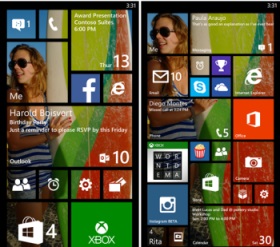
Microsoft in an attempt to offer more customisable options to Windows Phone users, has added ‘Start background’ feature that allows users to add an image to the tiles on the Start screen of the device.
new_start_screen_personalisation_microsoft.jpg
The feature will add an image of the user’s choice to multiple tiles on the Start screen. Earlier, the Live Tiles on the Start screen on Windows Phone 8 were limited to solid colours.
In 2013, Microsoft added the third Live Tile column on the Start screen of the Nokia Lumia 1520, and then left it to manufacturer adoption. However, with the Windows Phone 8.1, the company has now added an extra column of Live Tiles on all screen sizes, with users able to choose whether to turn this feature on.
2. Cortana: Finally arrives to take on Apple’s Siri and Google’s Google Now
One of the highlight features of Windows Phone 8.1 is Cortana, which is Microsoft’s voice-based virtual assistant. The Redmond giant’s Cortana is based on a popular AI character in Microsoft’s blockbuster video game franchise, Halo.
Cortana is powered by Bing and is similar to Apple’s Siri or Google Now, completely replacing the search feature in WP8.1. Microsoft’s Joe Belfiore claimed that the new digital assistant from Microsoft will get better with time as a user spends more time with it by asking questions to Cortana, filling up details in its Notebook section.
windows_phone_8_1_cortana_screenshot.jpg
Cortana can be launched by pressing the Live Tile placed on the Start screen or by pressing the Search button on the Windows Phone device. Belfiore said that Cortana can interact verbally or by typing, and stressed its ability to understand natural language voice commands. It can also interact with third party apps, though developers will have to build Cortana-compatibility into their apps.
Microsoft has announced that Cortana will be available first in the US as a ‘beta’ and later will released in the UK and China in the second half of 2014, while in other countries Cortana might reach by 2015.
windows_phone_8_1_action_centre.jpg
3. Action Centre for notifications
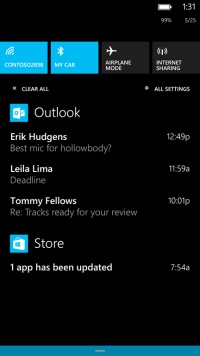
Microsoft has finally launched one of the most awaited features on Windows Phone platform, the Action Centre. The Windows Phone 8.1 update brings the Action Centre to all Windows Phone-based devices which will show notifications for calls, messages, emails, apps and others. It will also offer quick settings access to Flight Mode, Bluetooth, Wi-Fi, and Rotation Lock options. Notably, the quick access options are customisable.
The Action Centre for Windows Phone 8.1 can be accessed by a simple drop down swipe gesture like seen in Android and iOS.
4. Word Flow Keyboard
Another big addition in the Windows Phone 8.1 has been the introduction of the Word Flow Keyboard, which is a Swype keyboard-like feature for Windows Phone users. The Word Flow Keyboard allows users to glide over the display and type words.
Microsoft claims that the Word Flow Keyboard is one of the ‘most intuitive smartphone keyboards’ and learns from users writing style. Belfiore noted that the Word Flow Keyboard supports 16 languages, though has not named the languages supported.
Belfiore even claimed that, thanks to Word Flow Keyboard, a kid was able break the Guinness World Record for fastest writing on a smartphone earlier held by Swype keyboard on a Samsung Galaxy S4.
skype_dialler_integration_windows_phone_8_1.jpg
5. Skype Integration
Microsoft has also upgraded the Skype integration in Windows Phone devices with its latest Windows Phone 8.1. Now, the new Skype app for Windows Phone 8.1 comes with dialler integration that allows a user to switch a regular call to a Skype video call with a click of a button. Further, Skype has also been designed to work with Cortana, as users can setup Skype calls via the new voice-based virtual assistant.
6. Upgraded imaging experience
Microsoft takes the Windows Phone photography experience to the next level with the revamped Camera Roll, which gives quick access to clicked images, image tweaking tools and sharing capabilities.
The Smart Shots, Cinemagraphs, and Refocus photos options are directly accessible now from Camera Roll. Microsoft has also added the burst mode features to its Windows Phone 8.1 for clicking continuous images.
Creative Studio has been also added to the Camera Roll, which can use five new filters. The Nokia Storyteller has also received a slight addition with new video slideshow option that allows sharing via Facebook and Twitter.
7. New Sense feature for Windows Phone users
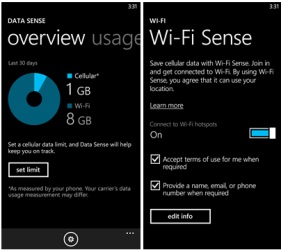
Microsoft has introduced the new Sense apps that include Data Sense, Wi-Fi Sense and Storage Sense.
sense_apps_windows_phone_8_1.jpg
Data Sense gives a detailed track of data usage on a Windows Phone, which could be braked down according to time- a month, a week etc. Data Sense includes a ‘high savings’ mode that the company claims will compress the images browsed on the Web, so a user can search more without with less data usage.
Another Sense app is Wi-Fi Sense, which automatically connects to a nearby Wi-Fi hotspot (when detected) to conserve cellular data.
Notably, when Wi-Fi is turned off in Wi-Fi Sense; Cortana can automatically turn it on, when a favourite location with hotspot is available.
Storage Sense can help users manage content stored on the microSD card and inbuilt storage by moving apps, music, images and videos between inbuilt storage and microSD card.
In addition, Microsoft has also improved its Battery Sense feature, giving a breakdown of apps’ battery consumption, and also includes an ‘automatic mode’ in the Battery Saver option that can help extend battery life.
8. Slew of new delights
Apart from the major highlights of the Windows Phone 8.1, Microsoft has also added a number of minor tweaks to its OS.
nokia_lumia_630_lumia_635.jpg
After multiple leaks, the onscreen keys are official with Windows Phone 8.1. The onscreen keys for Search, Start and Back will now appear at the bottom of the display and this will mean that future Windows Phone 8.1-based devices will not feature the three capacitive buttons at the bottom of the front panel.
new_lockscreen_windows_phone8_1.jpg
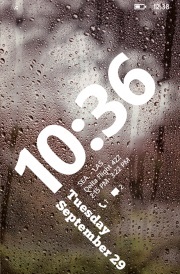
Microsoft has also introduced the new Lock Screen, which now comes with multiple Lock Screen themes featuring different visuals and animations – APIs are also available for developers to create their own themes and widgets.
The Calendar app has received a redesign and now shows a week view, along with a weather widget which has been integrated into the Calendar app. It will show at the top.
Various apps such as Music, Video and Podcasts have received improvements and are now split apps, all capable of update vie the Store.
The Internet Explorer 11 for Windows Phone 8.1 was also introduced. The new IE11 comes with new features such as InPrivate browsing, password caching, and a super-handy reading mode.

How to install WhatsApp and other apps on Nokia X from ‘unofficial’ sources


How to install WhatsApp and other apps on Nokia X from ‘unofficial’ sources


Nokia_X_sideload_cover.jpg

It’s well known now that Nokia’s new not-quite-Android budget smartphone, the Nokia X, is fully capable of running a huge number of Android apps, even those that aren’t available in Nokia’s own store app. Fortunately, it’s also pretty easy to find these apps and install them. We’ll take you through a simple tutorial so you can take advantage of this too.
Due to competition with the Windows Phone platform and limitations of the AOSP (Android Open Source Project) fork that Nokia has created for the X family, the Google Play store is not available on the Nokia X. This means that a lot of popular apps, such as WhatsApp, aren’t easily available to users.
Nokia_X_sideload_1.jpgIf apps aren’t available in Nokia’s own store, users have the option of checking any of four other Android app stores: 1mobile market, SlideME market, Aptoide, and Yandex Store. These are available from the Nokia store homepage as well as search results pages. Once installed, you can use any of them just as easily as the native app store.
For example, you can open the 1mobile market, and either choose a category to browse through or search for a title directly. Downloads and installs happen as usual.
For apps that are still beyond reach, Nokia allows side-loading from third-party sources. Android apps can be downloaded in APK format, although security is definitely a concern since APK files can be manipulated and infected with malware just like PC software installation files.
Nokia_X_sideload_2.jpgA small number of companies such as Whatsapp offer APK files directly from their own websites. Various download sites, such as http://www.download.com, also offer APK files for certain apps. You can load these files onto your Nokia X via a USB cable or simply download them through the browser.
You can tap the filename from the Fastlane screen if it’s just been downloaded, or find it in the Downloads app. The first time you try installing an APK, you’ll see an error message informing you that installing apps from third-party sources isn’t allowed for security reasons, but that you can change this in the Settings.
When you tap the Unknown Sources checkbox in the Security sections to allow this, you’ll see a second warning message. After this, you’re free to install anything you like, accepting the risk. You can tap the APK filename again now, and installation will proceed without any trouble.
Nokia_X_sideload_3.jpgSome apps, especially those which require Google services, might not run or might have limited functionality. You won’t be able to sign in to Google services to share game scores, and location-sensitive apps which rely on Google Maps also won’t function.

Gionee Elife E7 review

Gionee_Elife_E7_vertical_ndtv.jpg

If Gionee is trying to set itself apart from low-cost Indian smartphone companies, it’s doing a good job. While dozens of brands with little to no name value are busy fighting it out in the sub-Rs. 15,000 segment, Gionee has dared to try selling a phone priced above Rs. 25,000. Our market generally has a low opinion of Chinese products, even though it’s well known by now that nearly all Indian smartphone companies source their devices wholesale from China. Despite this (or perhaps because of this), Gionee seems to be trying to position itself above our local brands.
The new Elife E7 uses surprisingly powerful components and delivers performance scores which rival those of products priced significantly higher. In fact, it’s probably the cheapest device available with a Snapdragon 800 SoC and full-HD screen. It’s exactly the kind of product that will give Gionee some real legitimacy and brand power, if it works as it should. We’re going to see if Gionee has cut any corners in order to achieve this kind of low price, and whether your buying decision should be influenced by the name on the box.
Gionee_Elife_E7_hand_ndtv.jpgLook and feel
The E7 isn’t bad looking at all, even if it does remind us a little bit of some of Nokia’s more recent designs. The body is a single block of plastic, which in our case was a very glossy black. The plastic has an interesting granite texture, but the surface is totally flat and is almost too smooth to get a grip on.
The front panel is predictably bare, and thankfully free of ugly branding. The capacitive buttons below the screen are completely invisible when not illuminated, which is a tiny bit of a problem for usability. Above the screen, you’ll see only a small earpiece and front camera lens. The notification LED and sensors are well hidden.
Gionee_Elife_E7_rear_ndtv.jpgThe E7′s body bulges out a little at the back, and the camera lens protrudes even more. The two sides are completely flat, while the top and bottom are curved. The unibody construction is excellent, and we had no problem at all with the fit and finish of this phone. There’s only one ugly part of the design: all the mandatory regulatory information such as IMEI number is printed on a sticker on the lower back of the phone. We didn’t try peeling off the one on our test unit, but we hope it comes off easily so that users can really show off the E7′s smooth body.
Gionee has bucked at least one current design trend, and so the power button is in its traditional place on the top panel rather than on the right, which seems to be popular on large phones today. You can use the volume down button to wake the phone from standby, which is a welcome compromise. Everything else is fairly standard: there’s a volume rocker on the right edge, headset jack on top, USB port on the bottom, and SIM card tray on the left. The tray sits perfectly flush with the E7′s body, and you’ll need a pin to eject it.
Gionee_Elife_E7_tray_ndtv.jpgFeatures and software
The Gionee Elife E7 has pretty much every major box checked when it comes to current top-end must-have features. The processor is a Qualcomm Snapdragon 800, running at up to 2.2GHz. Our test unit came with 16GB of built-in storage space and 2GB of RAM, but there’s also another variant with 32GB of storage and 3GB of RAM. Considering the relatively small price difference between the two, and the fact that this phone doesn’t have a microSD slot for additional space, we really can’t see any reason to choose the 16GB variant over the 32GB one.
The screen is crisp and bright, thanks to the full-HD resolution at 5.5 inches. It is highly reflective and gets washed out a bit in sunlight unless you really raise the brightness level. Wireless is covered with Bluetooth 4.0, NFC, Wi-Fi and GPS. The battery weighs in at a hefty 2,500mAh.
The E7 is a single-SIM phone with 3G but not LTE support. That and the lack of expandable storage are the only things missing from the feature list, but considering the state of LTE in India, the 32GB variant is still highly competitive with other manufacturers’ top offerings.
Gionee_Elife_E7_sides_ndtv.jpgOur positive impressions of the E7′s hardware are unfortunately diluted by its lacklustre software. The E7 runs Android 4.2.2, which by anyone’s standard is behind the times. Gionee has evidently spent a lot of time and effort in customising the interface, but absolutely none of it is an improvement over stock Android. For starters, there are no home screens: you are taken directly into the app grid from the lock screen. This means that widgets are completely unavailable, except for a weather readout that stays permanently attached to the top of the screen.
From the lock screen, you can swipe left to show shortcuts to the camera, voice recorder, torch and “FakeCall” apps, which are all pretty handy. Tapping the FakeCall icon makes your phone ring after 15 seconds, with a totally genuine-looking caller ID screen (which shows a name you can set in advance). If you pick up this fake call, there’s even a prerecorded woman’s voice saying “Hi, can you send me the file as soon as possible, please”.
Swiping up instead unlocks the phone, and the icon grid just slides into view. There’s a lot of wasted space, and between the weather widget on top and dock on the bottom, there’s only space for 12 icons. The dock isn’t visually distinct, so it’s odd to see those four icons stay put while the rest slide around when you scroll between pages. You can also swipe down from any point on the icon grid to lock the phone again.
Gionee_Elife_E7_customUI_ndtv.jpgGionee’s personal touches extend to the quick settings panel in the notifications tray, which shows 15 icons that you can choose and reorder. The main settings app is oddly subdivided into two sections, Common Settings and All Settings, which seems a bit redundant. The Common settings are duplicates of entries in All Settings, of which most are the top anyway. There’s also no way to search for apps or settings, and no quick access Google web search.
Quite a few apps are included, though few are genuinely useful. UC Browser is the default web browser, replacing Android’s default option. Charm Cam offers a number of filters and effects which aren’t of very high quality, but are fun enough to use. GioneeXender lets you create Wi-Fi mesh networks to exchange files between devices. NQ security claims to optimise your device, scan news apps and downloads, hide files and call records from spying eyes, and back up contacts.
Gionee_Elife_E7_customUI2_ndtv.jpgKingsoft Office is a fairly capable app for viewing, sharing and creating documents in the popular MS Office formats. WeChat, BBM, Facebook and Twitter are preloaded for your various social needs, as are six rather low-quality games. Many of the apps have poorly translated English labels and options, especially a trio of utilities called Phone Accelerator, Power Manager and Traffic Assistant.
Overall, the E7′s menu feels cluttered, and we would have liked to have been able to get rid of some of these apps. At least there are plenty of launchers in the Google Play store to replace Gionee’s awful skin with.
Camera
Apart from the design and specifications, Gionee is also touting the E7′s 16-megapixel camera. Gionee has used a sapphire lens; a feature Apple popularised a year or two ago. In actual use, we were blown away by the camera’s quality. The photos it takes are truly outstanding, in a variety of situations and lighting conditions. Photos are richly detailed and accurate, with minimal noise. The camera also does an excellent job of detecting focus, and you can take beautiful close-ups with blurred backgrounds with no more effort than it takes to tap the screen once. We did find in some situations that the HDR mode resulted in overexposed images and exaggerated colours.
Video recording was much the same, with great quality and the ability to dramatically shift focus with a tap anywhere on screen. The E7 defaults to 720p, though 1080p is available in the settings menu. There’s also an anti-shake option, though Gionee hasn’t mentioned what kind of image stabilisation is at play. You can only zoom in and out by pinching with two fingers on screen, so that’s bound to make the phone shake.
Gionee_Elife_E7_camsample1.jpg(Click to see full size)
The front camera is also pretty impressive, though you don’t get the same sort of deep focus ability, and video recording tops out at 720p. 8 megapixels is far better than most cameras offer on their front cameras, so those who love taking selfies will be more than happy.
The default camera app has a pretty basic set of features, so you might want to try third-party alternatives which will let you get even more out of the excellent optics. Apart from a creative options panel, there isn’t much you can do in terms of manually adjusting settings. The bundled CharmCam app offers a few filters and special effects, but nothing really worth getting excited over.
Gionee_Elife_E7_camsample2.jpg(Click to see full size)
Performance
There doesn’t seem to be much the Gionee Elife E7 cannot do. It blew through all our benchmark tests, with performance only slightly trailing that of the Sony Xperia Z1 Compact. Both phones share roughly the same specifications, but the Z1 Compact’s lower-res screen is easier to drive.
We managed to achieve 22.8fps in GFXbench, and 3Dmark reported “Maxed out”, the highest possible score in both, the regular and Extreme Ice Storm scenarios. You’ll be comfortable playing most of today’s most immersive graphics-heavy games, not just the simple puzzles and runners that others with lesser phones are restricted to.
AnTuTu came in with an impressive 33,686 points, while Quadrant returned 20,246 points overall. Only the browser-based JavaScript tests, SunSpider and Kraken, reported poor scores. We can’t pinpoint a single reason for this, due to the variable nature of testing conditions and the fact that the E7′s default browser is UC Browser.
Gionee_Elife_E7_coverangle_ndtv.jpgAs expected, we had no problem whatsoever playing HD videos. Audio quality was decent, but the built-in speaker is not especially loud or clear. The custom Music app offers a DTS effects panel and you can tweak parameters such as 3D effect, Focus, Clarity and Space Reverberation individually, or just choose from five presets. You’ll need really good earphones to really feel any difference these settings might make.
Another impressive aspect of the E7′s performance was its battery life. We managed to eke out just over nine hours’ worth of movie playback time in our loop test. Gionee doesn’t seem to have done a good job calibrating the battery, since it reported its remaining capacity as 1 percent for an extraordinarily long time, which meant at least in our case that the phone lasted much longer than it projected it would.
Gionee_Elife_E7_box_ndtv.jpgVerdict
There’s a lot to like about the Gionee E7. It has a fantastic camera, great screen, top-end performance, and a battery that didn’t let us down. The price is also quite unbelievably low – so low, in fact, that we have no problem recommending the more powerful 32GB variant over the base 16GB one.
Gionee is also quite aggressive about its plans for India, and that includes a huge network of service centres, eventually. So what it comes down to, finally, is the name. Gionee isn’t anywhere near as well established as Samsung, Sony, Nokia or LG, so spending nearly Rs. 30,000 will feel like a bit of a risk even if the value proposition is this good.
If you’re in two minds about trusting an unknown manufacturer, there’s always the Samsung Galaxy S4, which has now fallen in price, and the Google Nexus 5, which comes with stock Android 4.4. It’s also quite likely that last year’s other flagships, such as the HTC One, will also drop to this price level soon. The S4 offers expandable storage and the Nexus has far better software, but the Gionee Elife E7 is still a better rounded package.
We hope that Gionee does build a strong sales and service network in India. The E7 is fantastic value for money now, and sets the stage for more premium offerings in the future.

New technology can charge your smartphone in 30 seconds


storedot_prototype_charger_youtube.jpg

Does your smartphone run out of battery within few hours? Then you might be happy to know that a prototype charger has been showcased that promises to charge a device from zero to 100 percent in just 30 seconds.An Israeli firm dubbed StoreDot introduced this prototype charger at Microsoft’s Think Next Conference in Tel Aviv. As of now, StoreDot has only developed the prototype charger for the Samsung Galaxy S4; however the company has plans to make chargers for more smartphones, reports Wall Street Journal.
The report further suggests that StoreDot’s prototype charger is expected to cost twice that of a regular charger, up to $30 and is likely to go under commercial production for late 2016.
The Israeli company has demoed the prototype charger of the Galaxy S4 in a video, which shows a laptop charger-sized device placed at the rear panel of the smartphone. Notably, the phone’s battery status is at 27 percent before plugging the StoreDot’s prototype charger.
Watch the video here:

The WSJ report further notes that the company intends to reduce the size of the prototype charger before going for commercial production.
It’s worth pointing out that StoreDot is famous for using bio-inspired nanotechnology and the yet-to-be-named prototype charger utilises quantum dot technology.
TechCrunch quotes StoreDot’s CEO and founder Dr. Doron Myersdorf who said, “We are about one year from a functional prototype that will be inside the device. Right now we show a battery that extends beyond the form factor of the smartphone. So in one year we’ll have reached the size, and in two years we’ll reach the required energy density for the entire day. So we are talking about three years for a commercial ready device. So I assume it will be three years before you can actually purchase it on the market.”

ON World Health Day, here are the apps and gadgets you need

fitbit_flex_fitness_tracker.jpg

Mankind has come a long way since the smallpox vaccine and penicillin. While these were discoveries that laid the foundation stone for modern day improvements in the sector, technology now is taking over the role of not just discovering new vistas, but also incorporating the same into pocket sized devices as well as, applications that can be used over smartphones. Taking a cue from wearable technology, the health sector now has found takers in the field of tracking bracelets and fitness trackers thereby taking innovation to a new level. Recently at a media event organised by Philips India, the company unveiled a portable ECG scanner, a portable Ultrasound scanner (Mobile Obstetrical Monitoring), IntelliSpace Consultative Critical Care (ICCC), a telehealth solution for remote intensive care delivery in rural and urban areas of India. On the occasion of World Health Day we take a look at some of these devices and applications that have found popularity in the medical fraternity and the general public.  Track-a-thon:
No it is not a new game being inducted into the Olympics, but with the wide array of fitness trackers and bracelets that are available in the market for users.
Fitbit Flex:
With a rubberised bracelet that is high on comfort along with a fluid design (LED Lights), it not only doubles up as a wireless tracker that sync’s with an app to monitor sleep patterns, calories burnt and distance walked through the day (see main image). Not only does it work towards monitoring but also reminds users of their fitness goals. Smart methods to motivate couch potatoes, we guess. Not exactly overpriced but the Fitbit Flex could set a user back by $99 (approximately Rs. 6,100).
Nike Fuel Band:
The Nike+ app keeps getting better. From a small chip inserted into Nike+ enabled running shoes to now fitness trackers that sync with the iPhone and iPod seamlessly to provide the necessary data Nike’s taking its fitness goals very seriously. Using something called Fuel Points, the Fuel band motivates users by giving congratulatory messages once a particular Fuel Point target has been achieved. Also doubling up as a watch the device is not bulky but has its limitations with no sleep tracking built in. On the other hand it provides with the regular features of workout count, calorie count amongst others. It doesn’t come cheap with its Rs. 12,500 price tag built in.
nike_fuel_armband.pngGoQii Life Fitness Tracker with Lifestyle Coaching:
Featuring an advanced wearable tracker, the GoQii Life Fitness Tracker has some of the world’s leading fitness coaches help users to activate that perfect lifestyle. Using Bluetooth to sync easily and using low energy in the process, the device has a 360-degree motion sensor, measures activity and sleep quality and has a custom designed vibration to wake a user at a desired time. It is currently available in India via Snapdeal for prices ranging from Rs. 5,999 – Rs. 9,999.
goqii_life_fitness_tracker_1 .jpgThe App Wrap-up:
While trackers are making use of the Internet and sensors within them for helping provide for accurate diagnostics, for those who cannot afford to pay for expensive devices, there are apps on the Google Play Store and the iTunes Store that enables users to convert their smartphones to trackers.
Pact: (for iPhone and Android) Feel pangs of guilt after a binge eating spree that includes foods destined to fatten you up? The Pact app is here to do just the same. Literally a pact, the app allows users to state their goals. Following it, the users are paid money if and when they achieve their goals. On the flipside, users have to pay in the event that they indulge on that extra slice of chocolate cake or a deep fried burger. And believe it or not, the thought of earning extra pesos or having to shell a tide sum for not honouring the ‘Pact’ has moved users to having improved food habits.
pact_fitness_app.jpgPUMATRAC V2.0: (for Android) Am improvement over the previous version of the PUMATRAC the new one provides insights on how external conditions (day of the week, location, and weather) and personal behaviours (music choices and social media activity) affect your running performance. The app will help the runners will gain insights on their runscore. Distance run, GPS, calories burned, are the other features on it.
pumatrac_v2_fitness_app.jpgBarre3: (for iPhone $4.99- approximately Rs. 305) Approved by Madonna, the app is designed for those, who claim to have run out of time or have none of it to go to the gym. It makes use of ballet, yoga and Pilates to create low-impact workouts sessions that are impactful and are 10-minute long. Next time you meet a friend or that work colleague who laments about not having time to hit the gym, you know what to do.
barre_3_fitness_app.jpgFitStar Basic: (for iPhone and iPad)- Ok this one is to eliminate the need of a personal trainer completely. Customising workouts based on individual body structures, capabilities, goals, and feedback, is its thing. And post the exercise users have to rate the exercise, which in turn allows the app to adjust the intensity and the long-term viability of its goals accordingly. A premium version is available for $4.99 (approximately Rs. 305) per month, but the basic one works fine too for newbies.
fitstar_basic_fitness_app.jpg